Scope
Multi-mission orientation: Sentinel-1/BIOMASS/NISAR-like SAR workflows are covered by the docs and reference tables.

WORLDSAR Documentation
Multi-mission, multi-acquisition-mode SAR pipeline guided by ESA PhiLab. Use this page as the entry point to understand what the project is and where to go next.
WORLDSAR is designed as a Geospatial Foundation Model (GFM) workflow for SAR products, focused on reproducible generation and extraction of geospatial outputs across multiple missions. The project is guided by ESA PhiLab conventions and packaging patterns to keep execution stable on both local and cluster environments.
Multi-mission orientation: Sentinel-1/BIOMASS/NISAR-like SAR workflows are covered by the docs and reference tables.
Multi-acquisition-mode support: stripmap, swath and spotlight/scan modes are mapped in the tables and operational notes.
Run locally in VM mode by default, or use PBS cluster mode with one mode switch in the Makefile/CLI flow.
ESA PhiLab-led organization and paths are documented in main.sh and Makefile defaults.
Use these shortcuts to jump to the pages you need:
Set execution behavior by exporting or assigning variables at invocation time. Defaults are defined at the top of Makefile.
Mode selection:
WORLDSAR_MODE=vm   make run PRODUCT=<product_name_or_full_path>.SAFE
WORLDSAR_MODE=hpc  make run PRODUCT=<product_name_or_full_path>.SAFE
Useful defaults near the top of the Makefile:
WORLDSAR_MODE ?= vm
VM_PROJECT_ROOT ?= .
HPC_PROJECT_ROOT ?= /lustre/projects/1001/rdelprete/WORLDSAR
You can override any default on the command line, for example HPC_PBS_SELECT, SIF_IMAGE, or HPC_OUTPUT_DIR.
This diagram summarizes how make run validates runtime requirements and branches into VM or HPC execution.
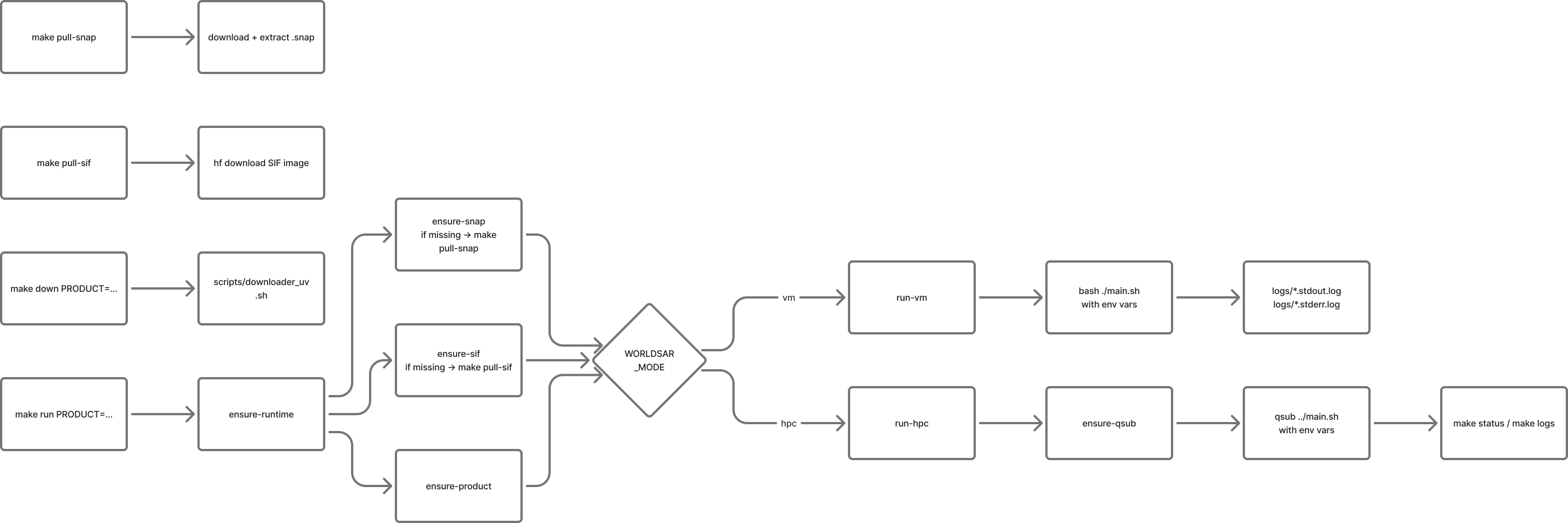
run to runtime checks, mode selection, and helper targets.| Target | Purpose | Notes |
|---|---|---|
help | Show available command summary. | Default target. |
down | Download SAR product into ./phidown_data. | Requires PRODUCT=.... |
ensure-sif | Ensure SIF image exists. | Calls pull-sif if missing. |
ensure-snap | Ensure .snap userdir exists. | Calls pull-snap if missing. |
ensure-product | Validate that product input was provided. | Used by run targets. |
run | Run using selected mode. | Requires PRODUCT=...; in HPC mode PRODUCT is passed as a qsub environment variable so no positional args are sent. |
run-vm | Run locally without PBS. | Writes timestamped stdout/stderr logs. |
status | Show current job status. | Uses qstat -u $(PBS_USER). |
logs | Show recent log files. | Shows latest stdout/stderr and scheduler logs. |
clean | Remove output artifacts. | Removes output, tiles, and DB directories. |
clean-logs | Remove scheduler and runtime logs. | Cleans files under ./logs. |
pull-sif | Pull/update Singularity image from Hugging Face. | Uses scratch-based HF cache variables. |
pull-sif-generic | Pull/update Singularity image using project-local .tmp cache. | For environments where scratch cache is not preferred. |
pull-snap | Download and install SNAP userdir. | Fetches tarball, extracts .snap into project root. |
clean-snap-artifacts | Remove temporary SNAP pull artifacts. | Deletes ./.tmp/snap. |
list-data | List available local SAR data. | Reads ./phidown_data. |
downloader | Download a product via legacy downloader helper. | Requires PRODUCT=.... |
uploader | Upload products to Hugging Face. | Runs scripts/uploader.sh. On SpaceHPC, use HF_UPLOAD_NUM_WORKERS=1 (passes --num-workers 1) to avoid upload failures. |
show-cache | Show HF cache and temp directories. | Prints HF-related env paths. |
clean-hf-cache | Prune Hugging Face cache. | Runs hf cache prune. |
After the quick setup, follow the project progression above, then return here to jump to advanced sections.
sarpyx.sif, .snap)..SAFE product.make run-vm.git clone https://github.com/sirbastiano/WORLDSAR
cd WORLDSAR
make pull-sif
make pull-snap
make down PRODUCT=<product_name>.SAFE
make run-vm PRODUCT=<product_name>.SAFE